Mobile DevelopmentSource Code
Source Code Aplikasi Fingerprint Android
Oleh Afa HernandesDiperbarui 8 menit baca
Bagi rekan rekan yang kesulitan membuat otentikasi fingerprint di aplikasi android bisa coba source code berikut.
Di bagian app/res/layout :
activity_fingerprint.xml
<?xml version="1.0" encoding="utf-8"?><RelativeLayout xmlns:android="http://schemas.android.com/apk/res/android"    xmlns:tools="http://schemas.android.com/tools"    android:id="@+id/activity_fingerprint"    android:layout_width="match_parent"    android:layout_height="match_parent"    android:background="@color/colorPrimary"    >
    <LinearLayout        android:layout_width="match_parent"        android:id="@+id/headerLayout"        android:orientation="vertical"        android:gravity="center"        android:layout_marginTop="100dp"        android:layout_height="wrap_content">        <ImageView            android:layout_width="fill_parent"            android:layout_height="170dp"            android:src="@drawable/logo"
            android:paddingTop="2dp"            android:layout_marginBottom="30dp"/>        <ImageView            android:layout_width="70dp"            android:layout_height="70dp"            android:src="@drawable/ic_action_fingerprint"            android:id="@+id/icon"            android:paddingTop="2dp"            android:layout_marginBottom="30dp"/>
        <TextView            android:layout_width="wrap_content"            android:layout_height="wrap_content"            android:textColor="@color/textPrimary"            android:textSize="24sp"            android:text="@string/title_fingerprint"            android:layout_marginLeft="5dp"            android:layout_marginRight="5dp"            android:layout_marginTop="20dp"            android:layout_marginBottom="10dp"/>
        <TextView            android:layout_width="match_parent"            android:layout_height="wrap_content"            android:textColor="@color/textPrimary"            android:textSize="16sp"            android:textAlignment="center"            android:gravity="center"            android:id="@+id/desc"            android:text="@string/desc_fingerprint"            android:layout_margin="16dp"            android:paddingEnd="30dp"            android:paddingStart="30dp"/>
        <TextView            android:layout_width="match_parent"            android:layout_height="wrap_content"            android:textColor="@color/errorText"            android:textSize="14sp"            android:textAlignment="center"            android:id="@+id/errorText"            android:paddingEnd="30dp"            android:paddingStart="30dp"            android:layout_marginTop="30dp"            android:gravity="center"/>
    </LinearLayout>
    <TextView        android:layout_width="wrap_content"        android:layout_height="wrap_content"        android:textColor="@color/textPrimaryDark"        android:textSize="14sp"        android:text="@string/note"        android:layout_marginLeft="16dp"        android:textAlignment="center"        android:layout_marginRight="16dp"        android:layout_marginBottom="26dp"        android:layout_alignParentBottom="true"/>
</RelativeLayout>
activity_home.xml
<?xml version="1.0" encoding="utf-8"?><androidx.coordinatorlayout.widget.CoordinatorLayout xmlns:android="http://schemas.android.com/apk/res/android"    xmlns:app="http://schemas.android.com/apk/res-auto"    xmlns:tools="http://schemas.android.com/tools"    android:layout_width="match_parent"    android:layout_height="match_parent"    android:fitsSystemWindows="true"    >
    <include layout="@layout/content_home" />
</androidx.coordinatorlayout.widget.CoordinatorLayout>
content_home.xml
<?xml version="1.0" encoding="utf-8"?><RelativeLayout xmlns:android="http://schemas.android.com/apk/res/android"    xmlns:app="http://schemas.android.com/apk/res-auto"    xmlns:tools="http://schemas.android.com/tools"    android:id="@+id/content_home"    android:layout_width="match_parent"    android:layout_height="match_parent"    android:paddingBottom="@dimen/activity_vertical_margin"    android:paddingLeft="@dimen/activity_horizontal_margin"    android:paddingRight="@dimen/activity_horizontal_margin"    android:paddingTop="@dimen/activity_vertical_margin"    tools:showIn="@layout/activity_home">    <ImageView        android:layout_width="fill_parent"        android:layout_height="wrap_content"android:src="@drawable/logo"/>    <TextView        android:layout_width="match_parent"        android:text="Beranda"        android:layout_centerVertical="true"        android:textSize="24sp"        android:textAlignment="center"        android:textColor="@color/colorPrimary"        android:layout_height="wrap_content" />
    <TextView        android:layout_width="match_parent"        android:text="Sukses Login"        android:layout_alignParentBottom="true"        android:textSize="14sp"        android:textAlignment="center"        android:textColor="@color/colorPrimary"        android:layout_height="wrap_content"        android:layout_marginBottom="24dp"/>
</RelativeLayout><?xml version="1.0" encoding="utf-8"?><RelativeLayout xmlns:android="http://schemas.android.com/apk/res/android"    xmlns:app="http://schemas.android.com/apk/res-auto"    xmlns:tools="http://schemas.android.com/tools"    android:id="@+id/content_home"    android:layout_width="match_parent"    android:layout_height="match_parent"    android:paddingBottom="@dimen/activity_vertical_margin"    android:paddingLeft="@dimen/activity_horizontal_margin"    android:paddingRight="@dimen/activity_horizontal_margin"    android:paddingTop="@dimen/activity_vertical_margin"    tools:showIn="@layout/activity_home">    <ImageView        android:layout_width="fill_parent"        android:layout_height="wrap_content"android:src="@drawable/logo"/>    <TextView        android:layout_width="match_parent"        android:text="Beranda"        android:layout_centerVertical="true"        android:textSize="24sp"        android:textAlignment="center"        android:textColor="@color/colorPrimary"        android:layout_height="wrap_content" />
    <TextView        android:layout_width="match_parent"        android:text="Sukses Login"        android:layout_alignParentBottom="true"        android:textSize="14sp"        android:textAlignment="center"        android:textColor="@color/colorPrimary"        android:layout_height="wrap_content"        android:layout_marginBottom="24dp"/>
</RelativeLayout>
Di bagian app/res/values:
strings.xml
<?xml version="1.0" encoding="utf-8"?><resources>    <color name="colorPrimary">#218851</color>    <color name="colorPrimaryDark">#00574B</color>    <color name="colorAccent">#082E17</color>
    <color name="textPrimary">#f5f5f5</color>    <color name="textPrimaryDark">#95aab4</color>    <color name="errorText">#ff7878</color>
</resources>
Di bagian app/src/Java:
Fingerprint_Activity.java
package com.example.apppost;
import android.Manifest;import android.annotation.TargetApi;import android.app.KeyguardManager;import android.content.pm.PackageManager;import android.hardware.fingerprint.FingerprintManager;import android.os.Build;import android.security.keystore.KeyGenParameterSpec;import android.security.keystore.KeyPermanentlyInvalidatedException;import android.security.keystore.KeyProperties;import android.os.Bundle;import android.widget.TextView;
import androidx.appcompat.app.AppCompatActivity;import androidx.core.app.ActivityCompat;
import java.io.IOException;import java.security.InvalidAlgorithmParameterException;import java.security.InvalidKeyException;import java.security.KeyStore;import java.security.KeyStoreException;import java.security.NoSuchAlgorithmException;import java.security.NoSuchProviderException;import java.security.UnrecoverableKeyException;import java.security.cert.CertificateException;import javax.crypto.Cipher;import javax.crypto.KeyGenerator;import javax.crypto.NoSuchPaddingException;import javax.crypto.SecretKey;
public class FingerprintActivity extends AppCompatActivity {
    private KeyStore keyStore;    // Variable used for storing the key in the Android Keystore container    private static final String KEY_NAME = "saibakun";    private Cipher cipher;    private TextView textView;
    @Override    protected void onCreate(Bundle savedInstanceState) {        super.onCreate(savedInstanceState);        setContentView(R.layout.activity_fingerprint);
        // Initializing both Android Keyguard Manager and Fingerprint Manager        KeyguardManager keyguardManager = (KeyguardManager) getSystemService(KEYGUARD_SERVICE);        FingerprintManager fingerprintManager = (FingerprintManager) getSystemService(FINGERPRINT_SERVICE);
        textView = (TextView) findViewById(R.id.errorText);
        // Check whether the device has a Fingerprint sensor.        if(!fingerprintManager.isHardwareDetected()){            /**             * An error message will be displayed if the device does not contain the fingerprint hardware.             * However if you plan to implement a default authentication method,             * you can redirect the user to a default authentication activity from here.             * Example:             * Intent intent = new Intent(this, DefaultAuthenticationActivity.class);             * startActivity(intent);             */            textView.setText("Your Device does not have a Fingerprint Sensor");        }else {            // Checks whether fingerprint permission is set on manifest            if (ActivityCompat.checkSelfPermission(this, Manifest.permission.USE_FINGERPRINT) != PackageManager.PERMISSION_GRANTED) {                textView.setText("Fingerprint authentication permission not enabled");            }else{                // Check whether at least one fingerprint is registered                if (!fingerprintManager.hasEnrolledFingerprints()) {                    textView.setText("Register at least one fingerprint in Settings");                }else{                    // Checks whether lock screen security is enabled or not                    if (!keyguardManager.isKeyguardSecure()) {                        textView.setText("Lock screen security not enabled in Settings");                    }else{                        generateKey();
                        if (cipherInit()) {                            FingerprintManager.CryptoObject cryptoObject = new FingerprintManager.CryptoObject(cipher);                            FingerprintHandler helper = new FingerprintHandler(this);                            helper.startAuth(fingerprintManager, cryptoObject);                        }                    }                }            }        }    }
    @TargetApi(Build.VERSION_CODES.M)    protected void generateKey() {        try {            keyStore = KeyStore.getInstance("AndroidKeyStore");        } catch (Exception e) {            e.printStackTrace();        }
        KeyGenerator keyGenerator;        try {            keyGenerator = KeyGenerator.getInstance(KeyProperties.KEY_ALGORITHM_AES, "AndroidKeyStore");        } catch (NoSuchAlgorithmException | NoSuchProviderException e) {            throw new RuntimeException("Failed to get KeyGenerator instance", e);        }
        try {            keyStore.load(null);            keyGenerator.init(new                    KeyGenParameterSpec.Builder(KEY_NAME,                    KeyProperties.PURPOSE_ENCRYPT |                            KeyProperties.PURPOSE_DECRYPT)                    .setBlockModes(KeyProperties.BLOCK_MODE_CBC)                    .setUserAuthenticationRequired(true)                    .setEncryptionPaddings(                            KeyProperties.ENCRYPTION_PADDING_PKCS7)                    .build());            keyGenerator.generateKey();        } catch (NoSuchAlgorithmException |                InvalidAlgorithmParameterException                | CertificateException | IOException e) {            throw new RuntimeException(e);        }    }
    @TargetApi(Build.VERSION_CODES.M)    public boolean cipherInit() {        try {            cipher = Cipher.getInstance(KeyProperties.KEY_ALGORITHM_AES + "/" + KeyProperties.BLOCK_MODE_CBC + "/" + KeyProperties.ENCRYPTION_PADDING_PKCS7);        } catch (NoSuchAlgorithmException | NoSuchPaddingException e) {            throw new RuntimeException("Failed to get Cipher", e);        }
        try {            keyStore.load(null);            SecretKey key = (SecretKey) keyStore.getKey(KEY_NAME,                    null);            cipher.init(Cipher.ENCRYPT_MODE, key);            return true;        } catch (KeyPermanentlyInvalidatedException e) {            return false;        } catch (KeyStoreException | CertificateException | UnrecoverableKeyException | IOException | NoSuchAlgorithmException | InvalidKeyException e) {            throw new RuntimeException("Failed to init Cipher", e);        }    }}
FingerprintHandler.java
package com.example.apppost;
import android.Manifest;import android.app.Activity;import android.content.Context;import android.content.Intent;import android.content.pm.PackageManager;import android.hardware.fingerprint.FingerprintManager;import android.os.CancellationSignal;import android.widget.TextView;
import androidx.core.app.ActivityCompat;
public class FingerprintHandler extends FingerprintManager.AuthenticationCallback {
    private Context context;
    // Constructor    public FingerprintHandler(Context mContext) {        context = mContext;    }
    public void startAuth(FingerprintManager manager, FingerprintManager.CryptoObject cryptoObject) {        CancellationSignal cancellationSignal = new CancellationSignal();        if (ActivityCompat.checkSelfPermission(context, Manifest.permission.USE_FINGERPRINT) != PackageManager.PERMISSION_GRANTED) {            return;        }        manager.authenticate(cryptoObject, cancellationSignal, 0, this, null);    }
    @Override    public void onAuthenticationError(int errMsgId, CharSequence errString) {        this.update("Fingerprint Authentication error\n" + errString);    }
    @Override    public void onAuthenticationHelp(int helpMsgId, CharSequence helpString) {        this.update("Fingerprint Authentication help\n" + helpString);    }
    @Override    public void onAuthenticationFailed() {        this.update("Fingerprint Authentication failed.");    }
    @Override    public void onAuthenticationSucceeded(FingerprintManager.AuthenticationResult result) {        ((Activity) context).finish();        Intent intent = new Intent(context, HomeActivity.class);        context.startActivity(intent);    }
    private void update(String e){        TextView textView = (TextView) ((Activity)context).findViewById(R.id.errorText);        textView.setText(e);    }
}
HomeActivity.java
package com.example.apppost;
import android.os.Bundle;import android.widget.Toolbar;
import androidx.appcompat.app.AppCompatActivity;
public class HomeActivity extends AppCompatActivity {
    @Override    protected void onCreate(Bundle savedInstanceState) {        super.onCreate(savedInstanceState);        setContentView(R.layout.activity_home);//        Toolbar toolbar = (Toolbar) findViewById(R.id.toolbar);//        setSupportActionBar(toolbar);
    }
}
Android Manifest
<?xml version="1.0" encoding="utf-8"?><manifest xmlns:android="http://schemas.android.com/apk/res/android"    package="com.example.apppost">
    <uses-permission android:name="android.permission.USE_FINGERPRINT" />    <application        android:allowBackup="true"        android:icon="@mipmap/ic_launcher"        android:label="@string/app_name"        android:roundIcon="@mipmap/ic_launcher_round"        android:supportsRtl="true"        android:theme="@style/AppTheme">        <activity android:name=".FingerprintActivity">            <intent-filter>                <action android:name="android.intent.action.MAIN" />
                <category android:name="android.intent.category.LAUNCHER" />            </intent-filter>        </activity>    <activity        android:name=".HomeActivity"        android:label="@string/title_activity_home"        android:theme="@style/AppTheme"></activity>
    </application></manifest>
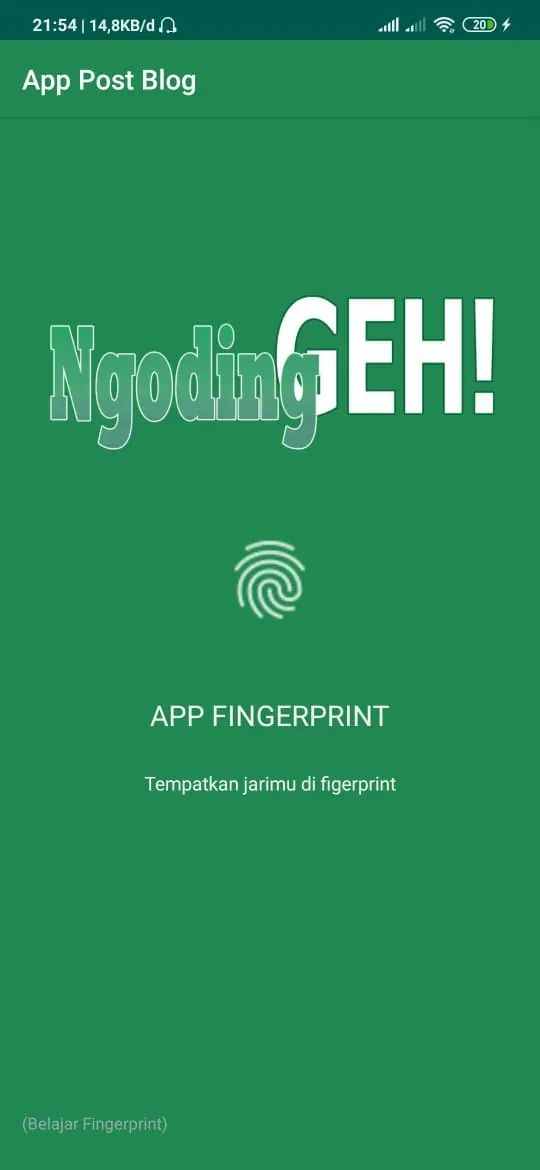
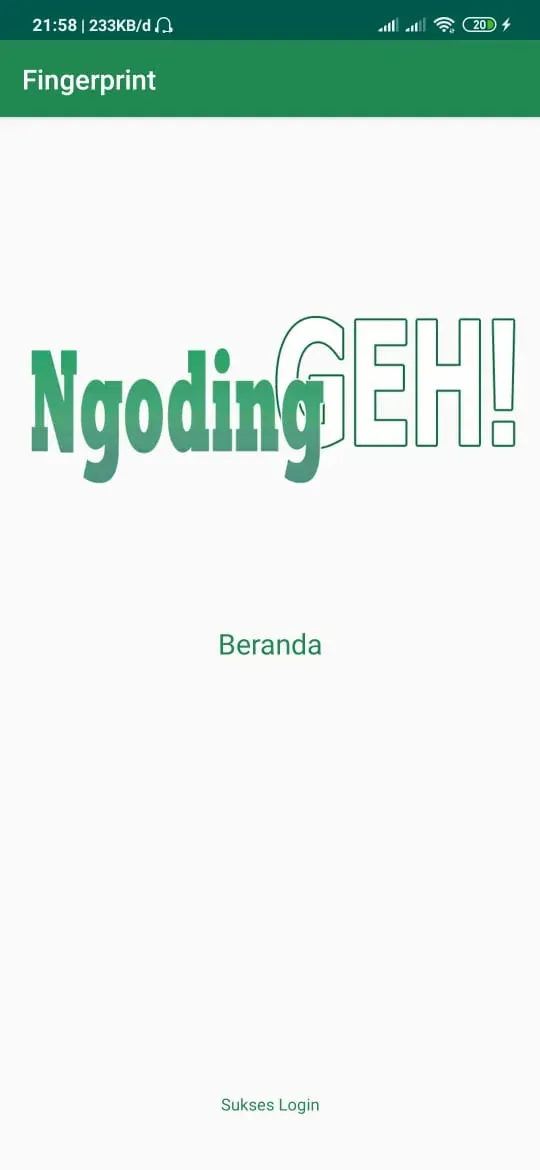
Hasilnya :